
It is match day, you open your favorite bookmark and find the page spinning endlessly. Not what you expected for your evening. The great thing is that most loading issues have straightforward reasons and you are likely to solve them within less than ten minutes.
But why could the website not load at all? In most cases, it is because of a connection problem, an outdated link, cached browser files, settings like DNS or VPN or simply some downtime of the website itself. These are the factors listed in the order an agent will check them, starting from the easiest to those requiring more effort. It doesn’t require any technical skills and does not pose any risks to your account.
Start with one question: is it you or the site?
Quick answer: Open another site and try a second device or network. If those work, the platform is up and the fix is on your side.
Cannot access UFABET (เข้า UFABET ไม่ได้)? Before you change any settings, find out where the problem actually sits. Open another site you use often, like a news page. If that loads fine, your internet works and the issue is limited to one site, your browser or your saved link.
Next, try the same link on a second device, or switch from Wi-Fi to mobile data. If it opens there, the platform is up and the fix is on your side. That one test saves a lot of guessing.
A step-by-step checklist that fixes most loading problems
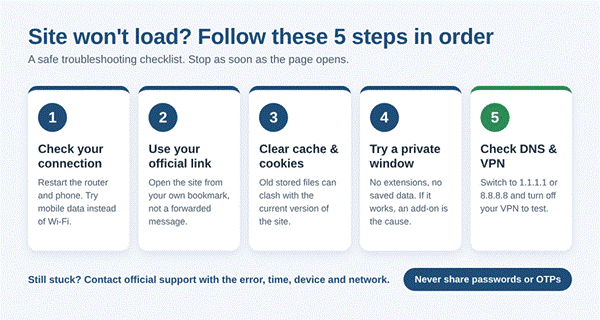
Here’s the sequence I’d follow for troubleshooting UFABET access issues (แก้ปัญหา UFABET), or any site that suddenly refuses to load. Work through it in order and stop as soon as the page opens.
1. Check your connection
Restart your router and your phone. It sounds too simple, but a fresh connection clears a surprising number of temporary glitches. On mobile data, make sure you haven’t lost signal or hit your data limit.
2. Use your saved, official link
Old links and small typos cause more failures than people expect. Open the site from your own bookmark or the brand’s official channel, not from a forwarded message or an old search result.
3. Clear your browser cache and cookies
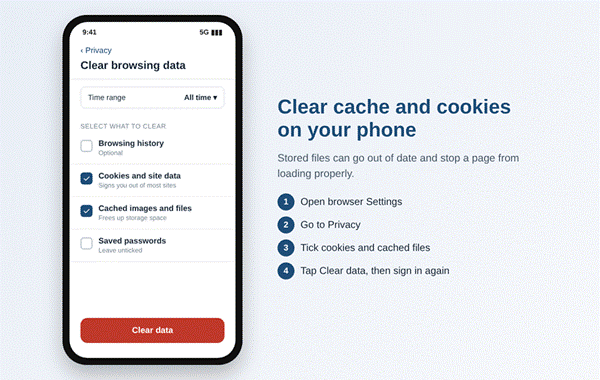
Your browser keeps copies of pages so they load faster next time. That browser cache is handy, but it can also hold old or outdated files that clash with the current version of a site. Clearing it, along with cookies, gives the page a clean start.
On a phone, it takes about a minute. Forbes has a simple guide on how to clear cache and cookies on iPhone, and Android browsers have the same option under Settings and Privacy. You’ll need to sign in again afterward, so keep your password handy.
4. Try another browser or a private window
A private or incognito window opens the site without extensions or saved data. If it works there, an extension, often an ad blocker, is the likely culprit. Switch extensions off one at a time until you find it.
5. Check your DNS and VPN
Quick answer: A slow or faulty DNS can stop pages loading. Switch to a public DNS like 1.1.1.1 and turn off your VPN to test.
DNS works like the internet’s phone book, turning a web address into a server location. When your provider’s DNS has a bad day, pages fail with errors like “server not found.” Switching to a public DNS such as 1.1.1.1 or 8.8.8.8 often fixes it. Using a VPN? Turn it off and test again.
Know when it’s a short service break
Quick answer: Maintenance or a traffic spike can make a site briefly unavailable. Check the official channels for updates and try again later.
Sometimes the platform itself is taking a breather. Scheduled maintenance or a traffic spike during a big match can make any site unavailable for a short time. A 503 error or a maintenance banner is the usual sign.
In that case, there’s nothing to fix on your device. Check the brand’s official social account or support chat for updates, then try again a little later.
Get help from support the smart way
Done everything above and the site still won’t open? Contact the official support team and give them the details they need: the exact error message, the time it happened, your device and browser, and whether you were on Wi-Fi or mobile data. A screenshot helps even more.
Never share your password or one-time codes, even with support. A genuine team will never ask for them. And if you still find UFABET inaccessible (UFABET เข้าไม่ได้) after every step, support can check your account and connection details directly and point you to the right fix.
Final thoughts
A page that won’t load feels like a big problem, but it’s usually a small one. Check whether it’s you or the site, use your official link, clear your cache, try another browser, and look at your DNS and VPN. If it’s maintenance, give it a few minutes.
Frequently asked questions
Q: Why does the site work on my phone but not on my laptop?
A: Usually it’s cached data, a browser extension or a network setting on the laptop. Clear the cache or try a private window first.
Q: Will clearing cookies delete my account?
A: No. It only signs you out on that browser. Your account and its settings stay safely on the platform’s side.
Q: Is it safe to use links shared in group chats?
A: Your own bookmark or the brand’s official channels are the safest choice, because you always know you’re landing on the right page.
Q: How long does maintenance usually last?
A: Planned maintenance is usually short. The official channel will normally post an expected end time.